
Wazuh
Modern organizations generate security events constantly.
Windows creates authentication logs.
Linux records system activity.
Firewalls record network events.
Applications generate logs.
Endpoints report process and file activity.
The challenge is not just collecting these events.
The challenge is understanding which events matter and detecting suspicious activity quickly.
This is where Wazuh comes in.
Wazuh is an open-source security platform that provides SIEM and XDR capabilities for monitoring endpoints, servers, cloud workloads, and security events.
What Is Wazuh?
Wazuh helps organizations collect, analyze, detect, investigate, and respond to security events.
It can monitor:
Windows
Linux
macOS
Servers
Cloud workloads
Containers
It can also collect logs from other security devices and systems through supported integrations.
Wazuh is popular because it is open source, customizable, and suitable for both security teams and cybersecurity learning environments.
Why Do Organizations Use Wazuh?
Wazuh can help security teams answer questions such as:
Who logged in?
Was the login suspicious?
What changed on the endpoint?
Is the system vulnerable?
Was a critical file modified?
Is the endpoint incorrectly configured?
Which system generated the alert?
Instead of checking every system individually, security teams can centralize and analyze security information through Wazuh.
Wazuh Architecture
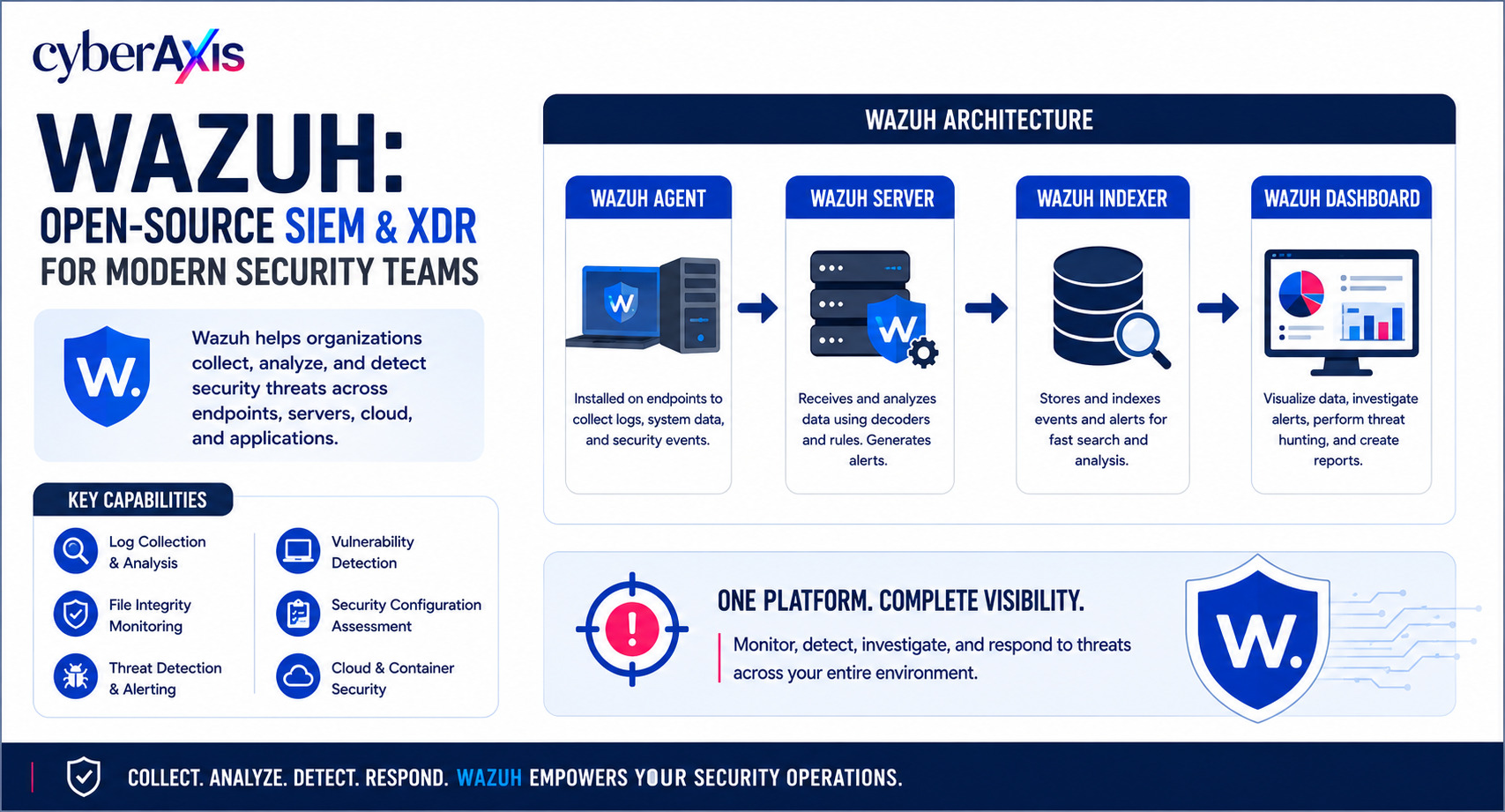
A typical Wazuh deployment contains four main components:
Wazuh Agent → Wazuh Server → Wazuh Indexer → Wazuh Dashboard
Wazuh Agent
The agent runs on monitored endpoints and collects security telemetry such as logs, file changes, system information, and configuration data.
Wazuh Server
The server receives events and analyzes them using rules and decoders to identify important or suspicious activity.
Wazuh Indexer
The indexer stores and organizes security events and alerts so they can be searched efficiently.
Wazuh Dashboard
The dashboard provides the interface for visualization, alert investigation, vulnerability review, FIM, configuration assessment, and reporting.
Key Wazuh Capabilities
1. Log Analysis
Wazuh can collect and analyze:
Windows Event Logs
Linux authentication logs
Application logs
Web server logs
Firewall logs
Other supported security events
This gives analysts centralized visibility instead of checking individual systems.
2. File Integrity Monitoring
File Integrity Monitoring (FIM) detects changes to selected files and directories.
For example, if a critical configuration file changes unexpectedly, Wazuh can generate an alert.
The analyst can then investigate:
What changed? When did it change? Was it authorized?
3. Vulnerability Detection
Wazuh can collect software inventory and identify known vulnerabilities affecting installed packages or applications.
This helps security teams prioritize systems that need patching.
4. Security Configuration Assessment
Wazuh's SCA capability evaluates endpoint configurations against security policies and benchmarks.
It can identify hardening gaps such as insecure settings, unnecessary services, or weak configurations.
5. Threat Detection
Wazuh can generate alerts for activities such as:
Brute-force attempts
Suspicious authentication
Malware-related events
Privilege-related activity
Rootkit indicators
File-integrity changes
Known indicators of compromise
6. System Inventory
Wazuh can provide information about monitored systems, installed applications, and software versions.
This helps organizations maintain better asset visibility.
How Wazuh Fits Into a SOC
A simple SOC workflow looks like:
Event → Alert → Triage → Investigation → Response
For example:
An employee has multiple failed login attempts.
Wazuh generates an alert.
The SOC analyst checks the username, source IP, endpoint, timing, and related events.
The analyst then determines whether the activity is:
Normal behavior, a false positive, or a potential attack.
This is where Wazuh becomes useful—not just for generating alerts, but for providing the information needed to investigate them.
Realistic Educational Example
Imagine a Linux server has a sensitive configuration file monitored by Wazuh FIM.
The file suddenly changes.
Wazuh generates an alert.
The analyst checks:
Which file changed?
When did it change?
Was the change authorized?
What other events happened around the same time?
If the change wasn't authorized, the SOC can investigate the server for additional signs of compromise.
A security alert is the beginning of an investigation, not the end.
Wazuh vs Antivirus
Wazuh and antivirus serve different purposes.
Antivirus / Endpoint Protection primarily focuses on detecting and preventing malicious software.
Wazuh provides broader visibility across areas such as logs, file integrity, vulnerabilities, system inventory, configuration, and security events.
They can work together rather than replace each other.
Wazuh Is Not a Complete Security Strategy
Wazuh is a powerful platform, but it doesn't replace:
MFA
Patch management
Network security
Endpoint protection
Secure application development
Backup and disaster recovery
Vulnerability management
Incident response
Skilled security analysts
The platform provides visibility and detection capabilities.
People still need to investigate the evidence and take the right action.
Why Learn Wazuh?
For cybersecurity students and SOC analysts, Wazuh provides practical exposure to:
SIEM + XDR + Log Analysis + Alert Triage + FIM + Vulnerability Management + Security Monitoring
A simple lab can look like:
Windows/Linux Endpoint → Wazuh Agent → Wazuh Server → Wazuh Dashboard
This allows learners to generate controlled security events and understand how alerts are created and investigated.
Final Thoughts
Wazuh isn't just another security dashboard.
Its real value is the visibility it provides across monitored systems.
The overall process is:
Collect → Analyze → Detect → Investigate → Respond
Remember: You can't respond effectively to a threat you can't see. Wazuh helps turn security data into visibility—and visibility into action.



Comments 0
Email-verified comments are reviewed before they are published.