Scroll to top
Action1 Solutions from CyberAxis
Autonomous Endpoint Management

Action1

Cloud-Native Patching That Just Works

Discover vulnerabilities, identify missing updates, deploy operating-system and third-party application patches, and verify compliance from one browser-based platform.

Action1 helps IT and security teams manage distributed endpoints without depending on a corporate VPN or local patching infrastructure.

Cross-OS PatchingWindows, macOS and Linux
No VPN RequiredManage remote and on-site endpoints
Real-Time VisibilityPatches, vulnerabilities and compliance
Autonomous Endpoint Management

From Missing Update to Verified Compliance

Cloud Native
DiscoverAssets & CVEs
PrioritizeRisk & SLA
PatchPolicy based
VerifyCompliance
Cross-OS PatchingWindows, macOS and Linux
Third-Party ApplicationsPrivately maintained repository
P2P DistributionEfficient update delivery
Live ComplianceReal-time reports and status
Unified Endpoint Security Operations

Discover, Prioritize and Remediate from One Platform

Traditional patching processes often depend on separate scanners, legacy infrastructure, VPN connectivity and manual packaging. These dependencies can delay remediation and leave remote systems outside normal patch cycles.

Action1 connects real-time endpoint visibility with policy-based remediation. Teams can identify vulnerable software, stage updates, patch operating systems and third-party applications, deploy software, and confirm compliance through one cloud-native console.

DiscoverLive endpoint and software visibility
PrioritizeFocus on meaningful vulnerabilities
AutomatePolicies, schedules and update rings
ReportPatch status and compliance evidence
Action1 Platform

Autonomous Endpoint Management for Distributed Environments

Bring patching, vulnerability remediation, software delivery, endpoint visibility and operational access together in a modern cloud-native platform.

Patch Management

Automate operating-system and application update deployment.
Third-Party Patching

Use a privately maintained application repository.

Vulnerability Management

Detect, prioritize and remediate vulnerable software.

Software Deployment

Distribute approved applications and custom packages.

Remote Desktop

Support Windows endpoints through browser-based access.

Asset Inventory

Maintain live hardware and software information.

Action1 Platform Overview

A unified view of cross-OS patching, third-party applications, vulnerability remediation and compliance.
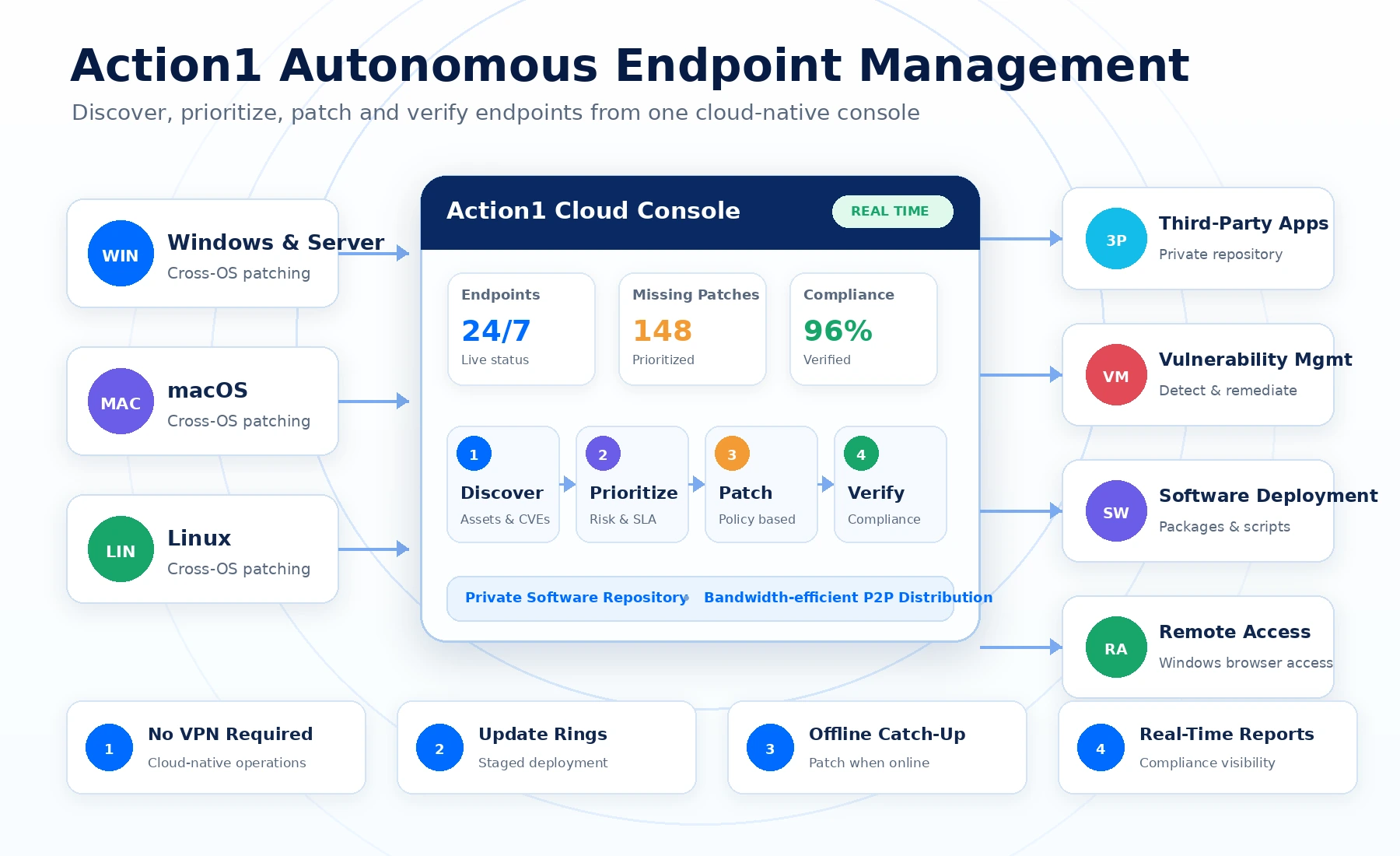
Action1 autonomous endpoint management platform overview

Select the image to open the larger readable view.

Cross-OS and Third-Party Patching

Maintain Continuous Patch Compliance

Manage Windows, macOS and Linux updates together with third-party application patches through consistent policies and schedules.

Unified Cross-OS Patching

Patch On-Site and Remote Endpoints

Deploy updates directly from the browser without requiring endpoints to be connected to the corporate network or VPN.

  • Windows desktop and server updates
  • macOS update automation
  • Linux update management
  • Immediate or scheduled deployment
  • Endpoint restart and user-notification controls
  • Automatic catch-up when offline devices reconnect
Third-Party Application Patching

Reduce Exposure from Outdated Business Applications

Detect missing third-party updates in real time and deploy tested packages from a privately maintained software repository.

  • Real-time missing-patch visibility
  • Policy-based application remediation
  • Vendor, application and severity criteria
  • Custom software-package support
  • Deployment status and installation logs
  • Consistent patching across distributed locations

Update Rings

Stage deployments and allow reliable updates to progress through controlled groups.

P2P Distribution

Share downloaded updates across the local network to reduce external bandwidth usage.

Maintenance Windows

Schedule deployments outside critical operating periods and manage reboot behaviour.

Compliance Reports

Track missing, installed and failed updates with detailed endpoint evidence.

Integrated Vulnerability Remediation

Move Directly from Detection to Corrective Action

Use live endpoint data to identify vulnerable software, prioritize risk and automate remediation according to organizational policies and service levels.

Real-Time Detection

Identify vulnerable operating systems and applications without relying only on periodic scan results.

Risk Prioritization

Focus attention on critical exposure and define remediation targets for different risk levels.

Automated Remediation

Deploy available operating-system and application updates through policy-driven schedules.

Compensating Controls

Document and automate mitigating actions when a vendor patch is unavailable or unsuitable.

Vulnerability and patch status in the same workflow
Remediation policies aligned with internal SLAs
Automatic deployment when offline devices reconnect
Verification and reporting after corrective action
Reduced delay between discovery and remediation
Consistent controls across remote and office endpoints
Software Deployment and Endpoint Automation

Go Beyond Patching with Practical Endpoint Actions

Software Deployment

Distribute Applications at Scale

Deploy or remove approved applications using repository packages or organization-specific software packages.

  • Ad-hoc and scheduled deployment
  • Custom software packages
  • Endpoint and group targeting
  • Installation status and reporting
Scripts and Commands

Automate Administrative Work

Run PowerShell, command-line and approved endpoint actions across individual systems or device groups.

  • Reusable automation workflows
  • Scheduled execution
  • Bulk endpoint actions
  • Execution result visibility
Reports and Alerts

Keep Operations Measurable

Create live reports, scheduled reports and alerts for patching, inventory, endpoint status and compliance.

  • Built-in and custom reports
  • Scheduled delivery
  • Operational alerts
  • Exportable evidence
Remote Access and Asset Visibility

Support Windows Endpoints and Maintain Live Inventory

Provide authorized administrators with browser-based access for Windows support while maintaining current hardware and software information across the managed environment.

Browser-Based Remote Desktop

Assist Users and Maintain Windows Systems

Connect to managed Windows endpoints from the browser for attended support or configured unattended access.

  • Windows remote desktop sessions
  • Attended and unattended workflows
  • Customizable end-user connection prompts
  • Regional connection routing
  • Centralized access from the endpoint console
  • Administrative control over remote-access availability
Action1 documentation currently lists Remote Desktop support for Windows endpoints. macOS and Linux remote desktop are not currently supported.
IT Asset Inventory

Maintain Current Hardware and Software Visibility

Use live endpoint information to support patch planning, software governance, security investigations and operational reporting.

  • Hardware and operating-system information
  • Installed software inventory
  • Missing update and vulnerability status
  • Endpoint health and online status
  • Custom endpoint attributes
  • Dynamic grouping and targeting
Enterprise Integrations

Extend Existing Identity, Directory and IT Workflows

Connect Action1 with Microsoft Intune, identity providers, Active Directory and automation interfaces to reduce duplication and improve administrative control.

Microsoft Intune

Extend Intune environments with real-time third-party patch visibility and consistent software-update workflows.

SSO and Identity

Support enterprise sign-in with Microsoft Entra ID, Okta, Duo and Google identity services.

Active Directory

Use directory information and existing organizational structures for endpoint administration.

REST API

Integrate endpoint and patch workflows with ticketing, reporting and security platforms.

PowerShell

Automate platform administration and endpoint operations through PowerShell tooling.

Multi-Organization & RBAC

Separate responsibilities and manage multiple environments using role-based access controls.

Integrations and Automation Overview

Connect existing enterprise services to real-time patching, remediation and reporting workflows.
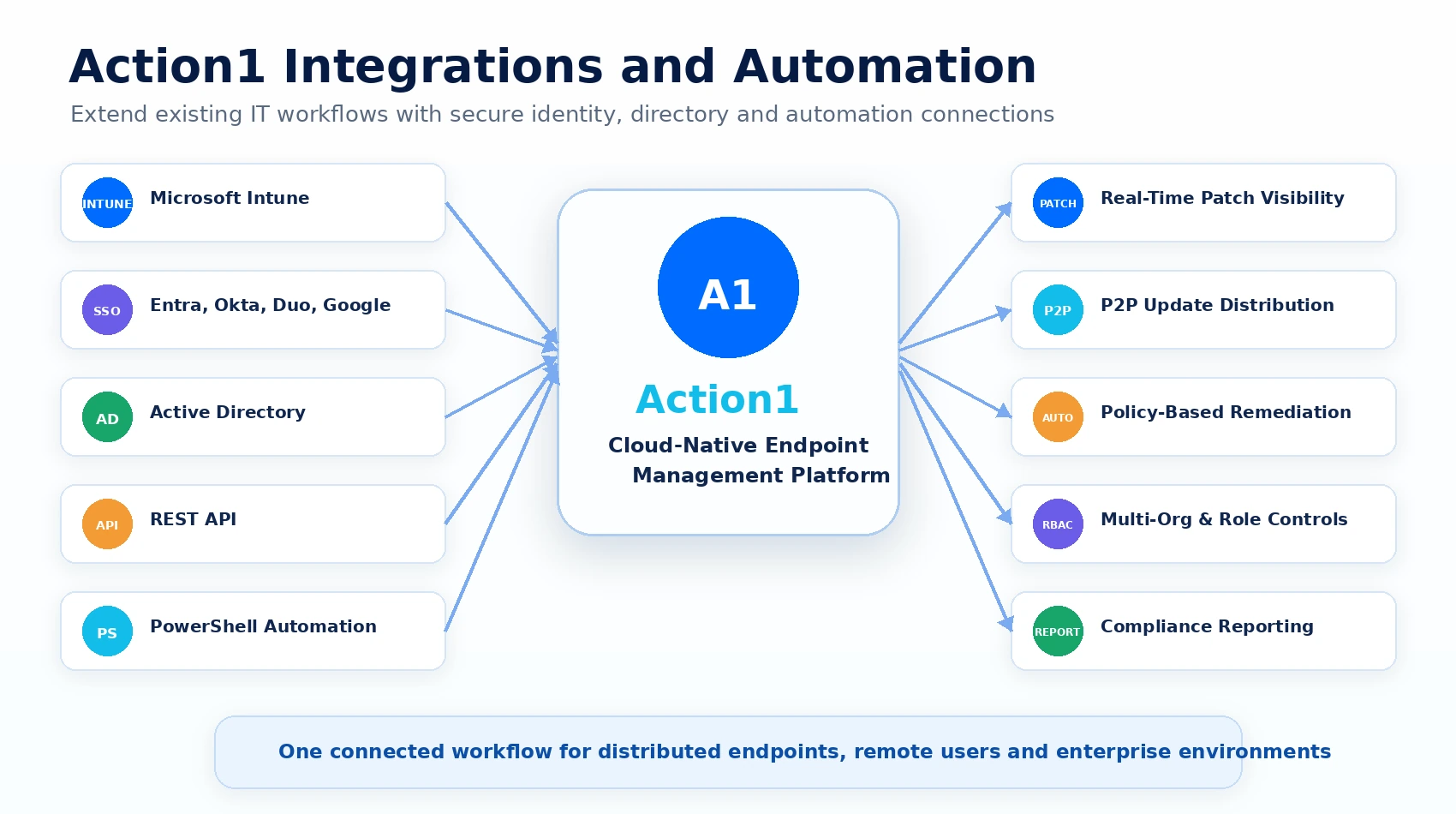
Action1 integrations and automation overview

Select the image to open the larger readable view.

Cloud-Native Deployment

Operate Across Office, Remote and Distributed Networks

Cloud Native
No VPN Required
Office Endpoints
Remote Workforce
Multiple Locations
Enterprise & MSP
Business and Operational Benefits

Improve Remediation Speed and Patch Consistency

Faster discovery and remediation of missing updates
Consistent cross-OS and third-party application patching
Reduced reliance on VPN and local patch infrastructure
Lower bandwidth impact through peer-to-peer distribution
Controlled deployment through update rings and schedules
Automatic catch-up for endpoints that were offline
Centralized patch, vulnerability and asset reporting
Improved coordination between IT and security teams
Action1 publishes security certifications including SOC 2 Type II and ISO/IEC 27001:2022. Platform deployment can support security and compliance operations, but product use alone does not guarantee organizational compliance.

Action1 Services from

From assessment and proof of concept to policy design, endpoint onboarding, rollout and managed patch operations.

Current patch-management and vulnerability assessment
Action1 architecture and rollout planning
Proof-of-concept deployment
Endpoint-agent deployment and onboarding
Windows, macOS and Linux policy configuration
Third-party application patch-policy setup
Update rings and phased deployment design
Maintenance-window and reboot-policy configuration
P2P distribution and bandwidth planning
Microsoft Intune integration
SSO, Active Directory and role configuration
Software repository and custom-package workflows
PowerShell and API automation support
Reports, dashboards and compliance evidence
Administrator training and documentation
Managed patch and vulnerability-remediation services

Strengthen Patch Compliance with Action1

Talk to CyberAxis about an Action1 product demonstration, technical assessment or proof-of-concept deployment.