
Splunk
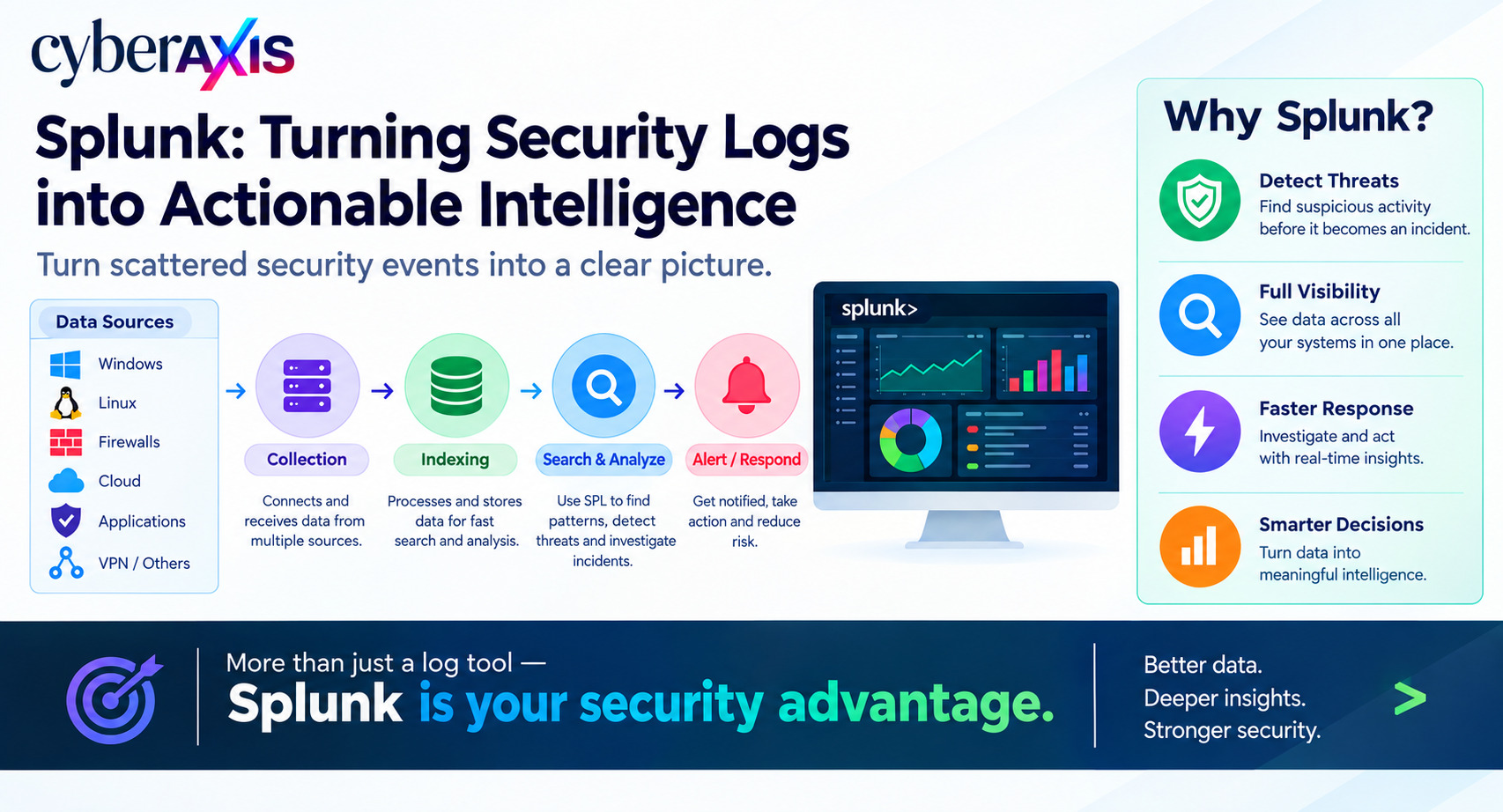
Every organization generates thousands or even millions of log events every day.
Windows systems, Linux servers, firewalls, VPNs, applications, cloud platforms, and security tools all generate data that can contain important security information.
The challenge is not collecting the logs.
The challenge is understanding what those logs are telling you.
This is where Splunk becomes useful.
Splunk is a data platform that can collect, index, search, analyze, monitor, and visualize machine-generated data from different sources. In cybersecurity, it is commonly used to support security monitoring, investigation, detection, and incident response.
What Is Splunk Used For?
Splunk helps organizations bring data from multiple systems into a centralized platform.
For example:
Windows Logs + Firewall Logs + VPN Logs + Endpoint Alerts + Authentication Logs
↓
Splunk
↓
Search + Analysis + Correlation + Alerts
Instead of checking each system separately, security analysts can investigate related activity from one platform.
Common security use cases include:
Brute-force detection
Password-spraying investigation
Malware investigation
Suspicious PowerShell activity
Firewall and VPN monitoring
Web attack detection
Account compromise investigation
Security dashboards and alerts
How Does Splunk Work?
A simplified Splunk workflow is:
Data Sources → Collection → Indexing → Search → Analysis → Alert / Response
1. Data Collection
Splunk can receive data from systems such as:
Windows and Linux
Firewalls
VPNs
DNS servers
Web servers
Applications
Cloud platforms
Endpoint security tools
2. Indexing
Splunk processes and stores the incoming data so that it can be searched efficiently.
3. Searching
Analysts search the stored data to find specific events, patterns, or suspicious activity.
This is where SPL (Search Processing Language) becomes important.
What Is SPL?
SPL allows analysts to search and analyze Splunk data.
For example, a simple search for Windows failed logins could look like:
index=windows EventCode=4625 | stats count by user, src_ip | sort - count
This can help an analyst identify accounts and source IP addresses associated with repeated failed authentication attempts.
SPL can be used for:
Filtering events
Counting activity
Finding patterns
Correlating events
Creating statistics
Building dashboards
Creating alerts
For SOC analysts, learning SPL is an important part of becoming effective with Splunk.
Splunk in a SOC
Splunk can become a central component of a Security Operations Center.
A typical workflow may look like:
Log Collection
↓
Detection
↓
Alert
↓
Triage
↓
Investigation
↓
Correlation
↓
Response
For example, a SOC analyst may receive an authentication alert and then use Splunk to investigate the source IP, targeted account, previous login activity, endpoint events, and related network connections.
This helps the analyst understand the complete timeline of an incident instead of looking at a single alert.
Realistic Example – Password Spraying
Imagine an attacker is attempting common passwords against hundreds of employee accounts.
The VPN records authentication failures.
Active Directory records account failures.
The firewall records the source IP.
Individually, these logs provide only part of the story.
With Splunk, the SOC analyst can correlate the activity and investigate:
Which accounts were targeted?
Which IP address generated the attempts?
Did any authentication succeed?
What happened after a successful login?
Were other systems accessed?
The analyst can then determine whether the activity is suspicious and start the appropriate response process.
Splunk Dashboards and Alerts
Splunk can also turn security data into dashboards and alerts.
A SOC dashboard might show:
Failed Logins | Critical Alerts | Malware Events | Top Source IPs | VPN Activity
Analysts can also create alerts for defined conditions.
For example:
More than 50 failed logins from one IP within 5 minutes
can trigger an alert for investigation.
This allows security teams to move from manually checking logs to automatically detecting known patterns.
Splunk Enterprise Security
Splunk itself is a broad data platform.
For security-focused operations, Splunk Enterprise Security (ES) provides additional capabilities such as SIEM functionality, security analytics, risk-based alerting, threat intelligence, and investigation workflows.
This allows security teams to use centralized security data for detection and investigation.
Why Should SOC Analysts Learn Splunk?
For cybersecurity professionals, Splunk helps develop practical skills in:
Log Analysis
SPL
Alert Investigation
Event Correlation
Threat Detection
Incident Investigation
Security Monitoring
The goal is not simply to know how to search logs.
The real skill is being able to look at different events and understand what happened, why it happened, and whether it represents a security incident.
What Splunk Does Not Replace
Splunk is not a replacement for every security control.
Organizations may still need:
EDR
Firewalls
Identity security
Vulnerability management
Email security
Backup and disaster recovery
Incident response
Skilled SOC analysts
Splunk provides visibility and analytics, while other security controls help prevent, detect, and respond to threats.
Final Thoughts
Modern organizations generate enormous amounts of security data.
Splunk helps turn that raw data into something security teams can search, analyze, correlate, and act on.
A single failed login may not mean much.
A failed login combined with a suspicious IP address, unusual endpoint activity, and abnormal network communication can tell a very different story.
That is the value of Splunk in cybersecurity: turning scattered security events into a clearer picture of what is happening inside an environment.
Remember: Splunk does not just store logs. It helps security teams find the story hidden inside them.


Comments 0
Email-verified comments are reviewed before they are published.