
Session Hijacking: The Attack That Can Bypass MFA
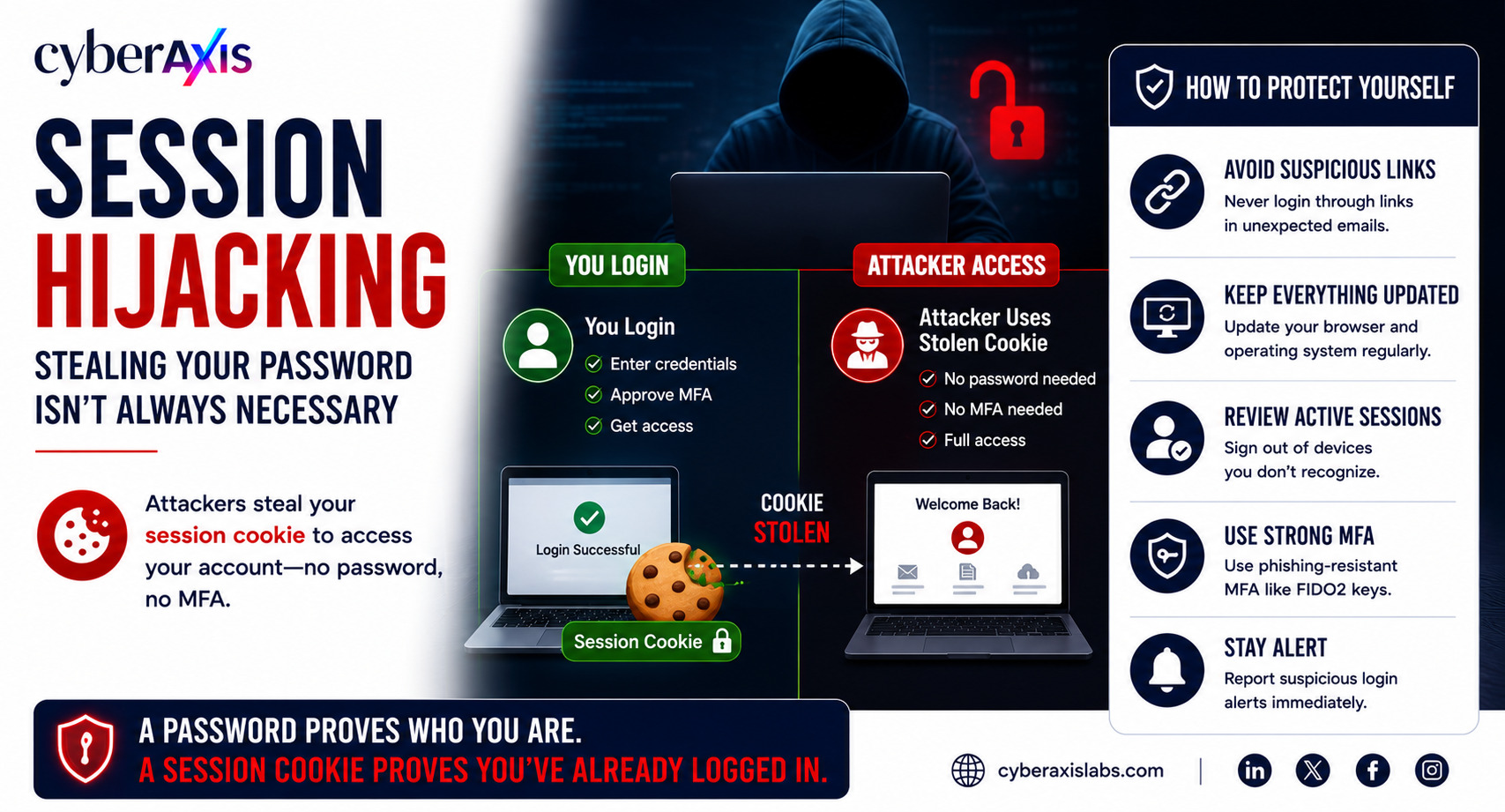
Many people believe that once they enable Multi-Factor Authentication (MFA), their accounts are completely secure.
Unfortunately, that's not always true.
Modern attackers don't always try to steal your password. Instead, they target something just as valuable—your authenticated session.
This technique is known as Session Hijacking or Cookie Theft.
What Is Session Hijacking?
When you log in to a website, you prove your identity using your username, password, and sometimes MFA.
After successful authentication, the website creates a session cookie and stores it in your browser. This cookie tells the website that you've already logged in, allowing you to continue using the application without entering your credentials on every page.
If an attacker steals that session cookie, they may be able to access your account without knowing your password or completing MFA.
In many cases, the website simply assumes the attacker is you because they present a valid session.
How Do Attackers Steal Session Cookies?
Cybercriminals use several techniques, including:
Malware that extracts browser cookies.
Phishing websites that capture authenticated sessions.
Malicious browser extensions that steal stored cookies.
Cross-Site Scripting (XSS) vulnerabilities.
Compromised devices or unsecured systems.
Once the cookie is stolen, attackers can import it into their own browser and potentially gain access to the victim's active session.
Realistic Example 1 – Bypassing MFA
Ramesh, an employee at an IT company, logs in to Microsoft 365 using his username, password, and Multi-Factor Authentication (MFA). Everything appears secure.
What Ramesh doesn't know is that malware is already running on his computer. After he successfully signs in, the malware steals the browser's authenticated session cookie and silently sends it to the attacker.
Instead of trying to log in using Ramesh's password or bypass MFA, the attacker simply imports the stolen session cookie into their own browser.
Because the session has already been authenticated, Microsoft 365 treats the attacker as the legitimate user, granting access without requiring another password or MFA prompt.
Lesson: MFA protects the authentication process—but it cannot protect a stolen authenticated session.
Realistic Example 2 – Fake Login Page
Bala, an employee at a startup, receives an email claiming that his Microsoft 365 session has expired. The email contains a link to what appears to be the official Microsoft login page.
Believing the message is legitimate, Bala signs in and successfully completes MFA.
Behind the scenes, the phishing toolkit captures his authenticated session cookie and immediately forwards it to the attacker.
Rather than stealing Bala's password, the attacker uses the stolen session cookie to access his Microsoft 365 account, email, and cloud applications.
Bala believes the login was successful, unaware that his authenticated session has already been compromised.
Lesson: Modern phishing attacks don't always steal passwords—they often steal authenticated sessions instead.
Why Session Hijacking Is Dangerous
A successful session hijacking attack can allow attackers to:
Access corporate email and cloud applications.
Read confidential business documents.
Impersonate legitimate users.
Steal sensitive business data.
Send phishing emails from trusted accounts.
Bypass MFA by reusing authenticated sessions.
Because the attacker uses a valid session, the activity often appears legitimate, making it more difficult to detect.
Quick Tips to Protect Yourself
Never log in through unexpected email links.
Keep your browser and operating system up to date.
Avoid installing untrusted browser extensions.
Sign out of important accounts when using shared or public devices.
Regularly review active sessions and sign out of devices you don't recognize.
Use phishing-resistant MFA methods such as Passkeys or FIDO2 security keys whenever possible.
Report suspicious login alerts immediately.
Keep endpoint protection enabled to detect malware that targets browser cookies.
Final Thoughts
Session hijacking reminds us that cybersecurity doesn't end after authentication.
Once an attacker steals a valid session cookie, they may no longer need your password—or even your MFA code.
Protecting accounts today means protecting both authentication and authenticated sessions.
Organizations should combine strong endpoint security, phishing awareness, session monitoring, and phishing-resistant MFA to reduce the risk of cookie theft.
Remember: A password proves who you are. A session cookie proves you're already trusted. Protect both.


Comments 0
Email-verified comments are reviewed before they are published.