
Whale Phishing Exposed
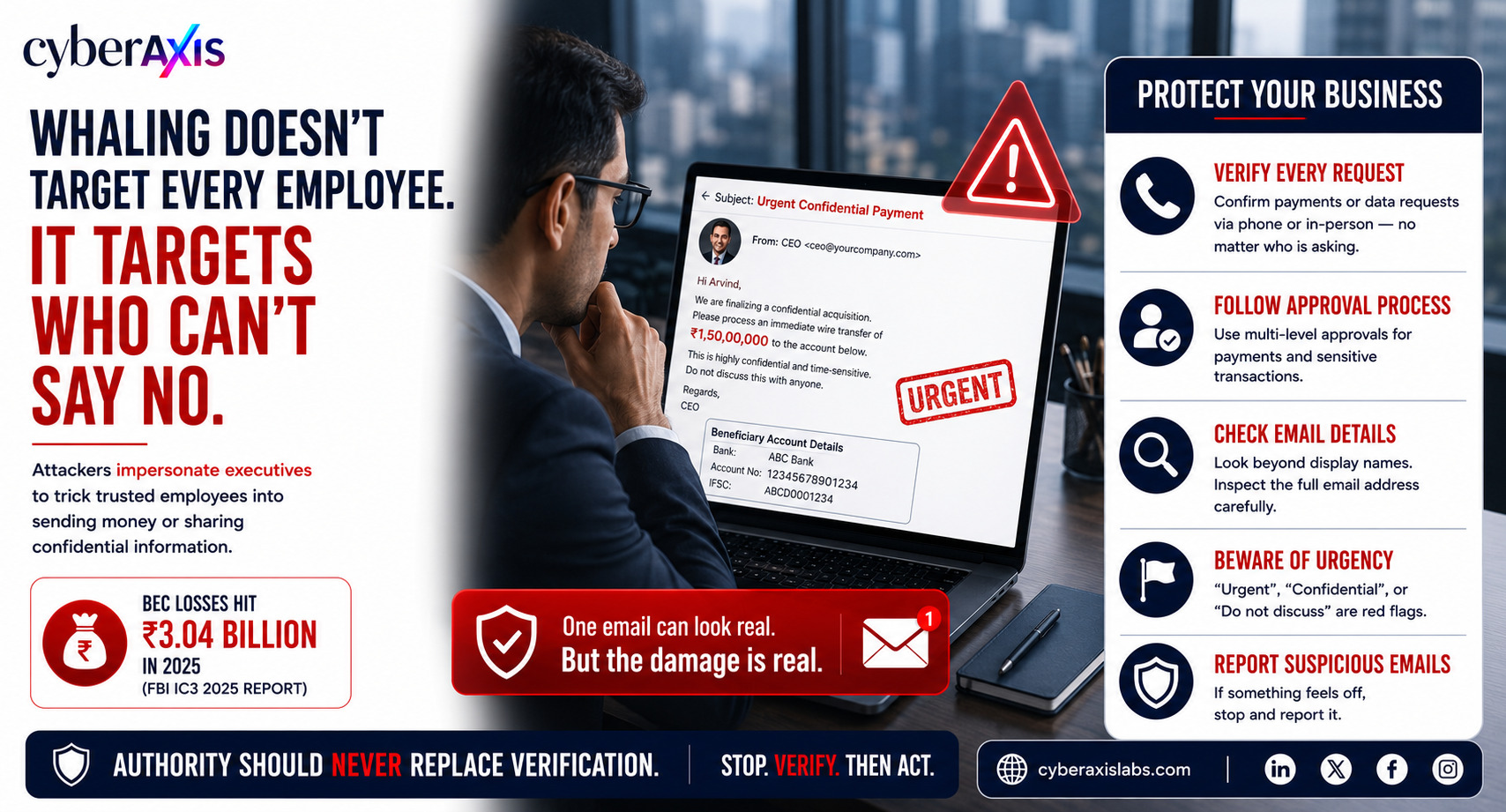
Most phishing attacks are a numbers game. Attackers send thousands of emails hoping that someone, somewhere, clicks a malicious link.
Whaling is different.
Instead of casting a wide net, attackers carefully choose a small group of individuals whose decisions can directly impact the business. These targets often include Managing Directors (MDs), CEOs, CFOs, finance executives, HR managers, procurement officers, executive assistants, or anyone trusted to approve payments, access confidential information, or authorize critical business decisions.
Why these people?
Because attackers know they're more likely to comply with requests from senior leadership without questioning them. They're not looking for the least technical employee—they're looking for the person who feels they can't say no.
Before launching an attack, cybercriminals spend days—or even weeks—researching their target. They gather information from company websites, LinkedIn profiles, press releases, social media, public records, and previous data breaches. They learn reporting structures, communication styles, ongoing projects, and even executive travel schedules.
Then they send a single, carefully crafted email.
There may be no malware, no suspicious attachment, and no malicious link. Instead, the email appears to come from someone the recipient trusts—a CEO requesting an urgent wire transfer, a CFO asking for confidential financial information, or a trusted vendor notifying the company of new banking details.
The objective isn't to compromise a computer.
The objective is to manipulate a trusted employee into doing exactly what they're already authorized to do—transfer money, share confidential information, approve invoices, or disclose sensitive business data.
That's what makes whaling one of the most dangerous forms of phishing. It exploits authority, urgency, and trust rather than technical vulnerabilities.
Realistic Example 1 – CEO Impersonation
Arvind is a Senior Finance Executive who reports directly to the Chief Financial Officer (CFO).
Late on a Friday afternoon, he receives an email that appears to come from the company's CEO.
Subject: Urgent Confidential Payment
The email explains that the company is finalizing a confidential acquisition and instructs Arvind to immediately transfer ₹1.5 crore to a newly provided bank account. It stresses that the transaction is highly confidential and asks him not to discuss it with anyone because the deal is extremely time-sensitive.
Everything looks legitimate. The display name matches the CEO, the writing style feels familiar, and the timing appears believable.
Believing the request is genuine, Arvind begins processing the payment.
Fortunately, company policy requires CFO approval for high-value transactions. Before approving the transfer, the CFO notices that the beneficiary account is unfamiliar and calls the CEO directly.
The CEO confirms that no such payment was requested.
The organization narrowly avoids a significant financial loss.
Lesson: Independent verification and approval workflows remain one of the strongest defenses against executive impersonation attacks.
Realistic Example 2 – Payroll Data Theft
Priya is an HR Manager responsible for maintaining employee payroll records.
She receives what appears to be an email from the Chief Human Resources Officer (CHRO) requesting the latest payroll spreadsheet for an urgent board meeting.
The email asks her to send the file directly instead of uploading it to the company's secure HR portal because "there isn't enough time."
The request appears genuine.
The sender's name is correct, the email signature looks authentic, and the message references an upcoming executive meeting.
Just before replying, Priya notices that the sender's email domain differs from the company's legitimate domain by a single character.
She immediately reports the email to the Security team.
The investigation confirms it was a whaling attack designed to steal employee names, salaries, bank account numbers, tax details, and other sensitive information.
Lesson: Always verify requests for confidential information—even when they appear to come from senior leadership.
Realistic Example 3 – Vendor Payment Fraud
Ramesh works in the Accounts Payable team and regularly processes invoices from long-term suppliers.
One morning, he receives an email from what appears to be one of the company's trusted vendors.
The sender explains that the company has changed banks and requests that all future payments be sent to a new account. The email includes legitimate invoice numbers, previous payment references, and accurate business details collected from earlier communications.
Everything appears legitimate.
Instead of immediately updating the vendor's banking information, Ramesh follows company policy and contacts the vendor using the phone number already stored in the organization's records—not the one provided in the email.
The vendor confirms that no banking changes have been made.
The attackers were attempting to redirect future payments into a fraudulent account.
Lesson: Always verify banking changes through a trusted, independent communication channel.
Quick Tips to Protect Yourself from Whaling Attacks
Pause before you act. Attackers rely on urgency to pressure you into making quick decisions.
Verify unusual requests. Confirm payment requests, confidential data requests, or banking changes through a trusted channel such as a phone call or Microsoft Teams.
Check the sender's email address carefully. Don't rely solely on the display name—look for subtle domain differences.
Be cautious of urgency and secrecy. Emails marked "Urgent," "Confidential," or "Do not discuss" should always raise suspicion.
Follow company approval processes. Never bypass verification or approval workflows, regardless of who appears to have sent the request.
Verify vendor banking changes independently. Contact the vendor using previously known contact details—not the information provided in the email.
Protect sensitive information. Only share payroll records, financial data, customer information, or credentials through approved and secure channels.
Report suspicious emails immediately. If something doesn't feel right, stop and notify your IT or Security team.
Final Thoughts
Whaling isn't about tricking random employees into clicking malicious links.
It's about identifying the one person whose decision can move money, expose confidential information, or authorize critical business actions—and convincing them that they can't say no.
Technology can help detect spoofed emails, but it can't stop someone from willingly approving a fraudulent request.
The most effective defense is a combination of strong security controls, clear verification procedures, and a workplace culture where employees feel empowered to verify unusual requests—even if they appear to come from the highest levels of the organization.
Remember: Authority should never replace verification. If a request is unusual, urgent, or asks you to bypass normal procedures, Stop. Verify. Then Act. A two-minute verification can prevent a multi-crore financial loss and protect your organization from a costly cyberattack.
Comments 0
Email-verified comments are reviewed before they are published.