
SSRF(Server-Side Request Forgery)
Imagine a web application that allows users to enter a URL.
For example:
https://example.com/image.jpg
The application receives the URL, fetches the content from the server, and displays it to the user.
That sounds harmless.
But what happens if an attacker provides a URL that points somewhere the attacker should never be able to reach?
Instead of attacking the internal system directly, the attacker makes the web server send the request on their behalf.
This is known as SSRF — Server-Side Request Forgery.
The attacker doesn't necessarily need direct access to the target.
They make your server access it for them.
What Is SSRF?
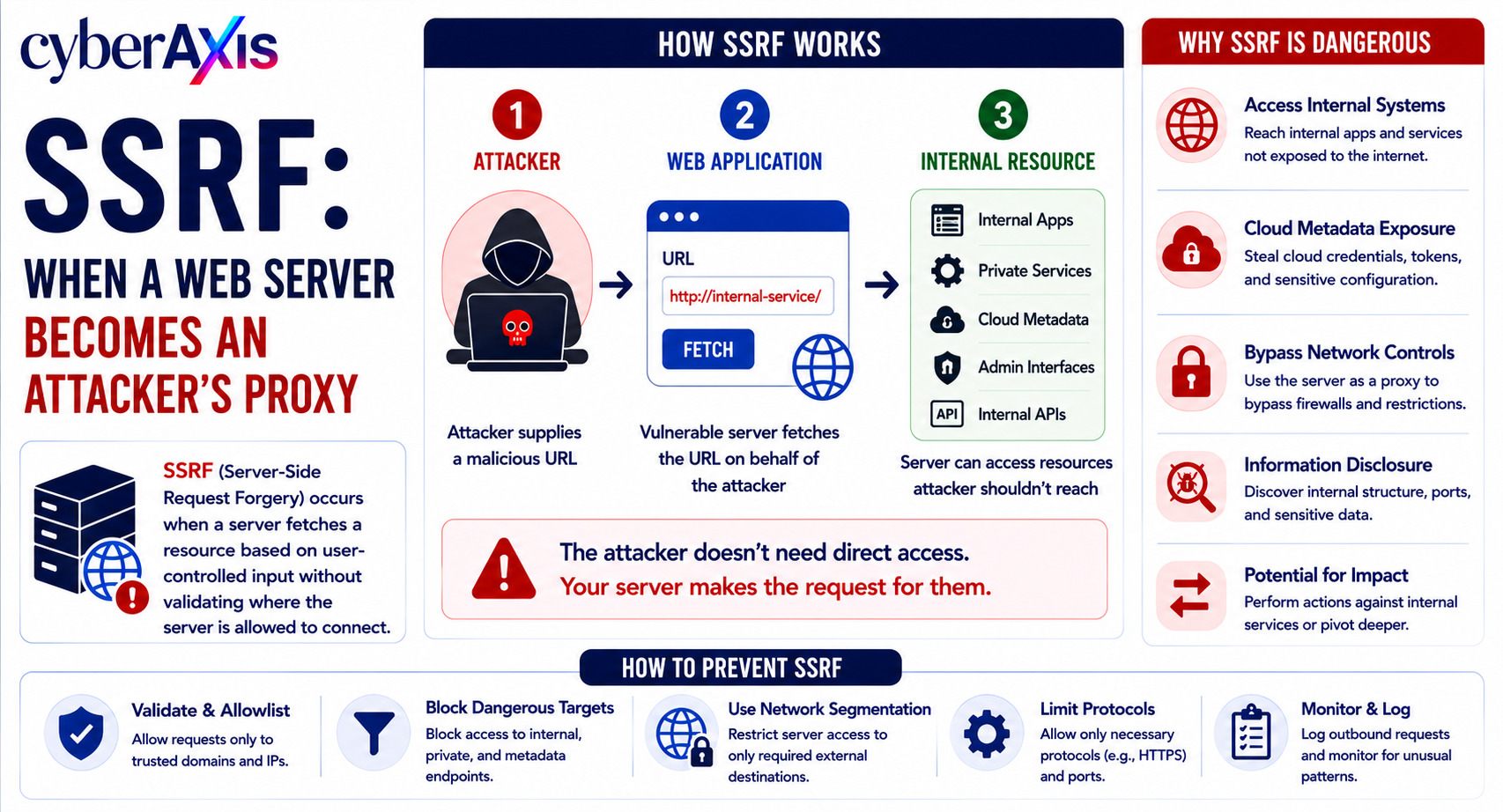
Server-Side Request Forgery (SSRF) is a vulnerability that occurs when a server retrieves a resource based on user-controlled input without properly validating where the server is allowed to connect.
The basic attack flow is:
Attacker → Web Application → Internal / External Resource
Normally, a user may be able to access only publicly available resources.
But if the server can make arbitrary requests, the attacker may be able to make it communicate with:
Internal web applications
Private network services
Cloud metadata services
Administrative interfaces
Internal APIs
Localhost services
Other systems that aren't directly accessible from the internet
This makes SSRF particularly dangerous in cloud and microservice environments.
How Does SSRF Happen?
Consider an application with a URL-fetching feature:
https://example.com/fetch?url=https://trusted-site.com/image.jpg
The server receives the URL and fetches the content.
A vulnerable application may effectively do:
User URL → Server → Requested URL
without asking:
"Is this destination actually allowed?"
An attacker can then attempt to make the server send requests to unexpected destinations.
The vulnerability isn't simply that the server can make HTTP requests.
The problem is that untrusted users can influence where those requests go.
Example 1 – Internal Application Access
Imagine a company has a public-facing web application.
The application contains a feature that imports images from a user-provided URL.
A normal request might be:
https://app.example.com/import?url=https://cdn.example.com/image.jpg
The server downloads the image and returns it to the user.
An attacker realizes that the server can also communicate with internal systems that aren't directly reachable from the internet.
During an authorized assessment, the tester verifies whether the application can access an internal service.
If successful, the vulnerable application becomes a proxy between the attacker and the internal network.
The attacker may then be able to interact with services that were never intended to be publicly accessible.
Lesson: A public-facing server should not automatically be trusted to access arbitrary internal resources.
Example 2 – Cloud Metadata Service
SSRF becomes particularly dangerous in cloud environments.
Cloud platforms commonly provide metadata services that applications can use to retrieve information about the instance or its environment.
Imagine an application running on a cloud virtual machine.
The application has a URL-fetching function that is vulnerable to SSRF.
An attacker manipulates the URL so the application sends a request toward the cloud instance's metadata service.
If the environment is improperly secured and sensitive credentials or tokens are exposed through that metadata interface, the attacker may potentially obtain information that can be used to access cloud resources.
The attacker never directly reached the cloud environment.
The vulnerable server reached it for them.
Lesson: Cloud workloads require SSRF defenses, metadata-service protections, and strict control over application network access.
What Makes SSRF Dangerous?
The impact depends on what the vulnerable server can reach and what permissions it has.
A successful SSRF attack could potentially allow an attacker to:
Access internal applications
Probe internal network services
Reach localhost-only interfaces
Access cloud metadata services
Interact with internal APIs
Read sensitive information
Perform actions against internal services
Potentially obtain credentials or tokens
Use the compromised application as a pivot point
The most important question is:
"What can the vulnerable server access?"
The answer determines how dangerous SSRF can become.
SSRF Can Be Used as a Pivot
One of the most important concepts in SSRF is network reachability.
An attacker may not be able to access:
Internal Server → Port 8080
directly from the internet.
But the vulnerable application might be able to.
The attack path becomes:
Attacker → Vulnerable Web Application → Internal Server
The web application effectively becomes the attacker's proxy or pivot point.
That's where the title comes from:
The server becomes the attacker's proxy.
SSRF vs CSRF
These vulnerabilities are often confused because both contain "Request Forgery."
But they are very different.
SSRF – Server-Side Request Forgery
The attacker tricks the server into making a request.
Attacker → Server → Target
CSRF – Cross-Site Request Forgery
The attacker tricks a victim's browser into making an unwanted request to a website where the victim is authenticated.
Attacker → Victim's Browser → Web Application
The key difference is who sends the forged request.
Types of SSRF
1. Basic SSRF
The attacker can directly influence the destination URL requested by the server.
The server retrieves the requested resource and returns some or all of the response.
2. Blind SSRF
The server makes the request, but the attacker doesn't receive the response directly.
The attacker may instead infer that the request occurred through:
Response timing
Application behavior
DNS interactions
Logging
Out-of-band monitoring
Blind SSRF can be harder to detect and validate.
3. Second-Order SSRF
In some cases, the malicious input isn't used immediately.
The application stores the attacker-controlled URL and processes it later.
For example:
Attacker Input → Database → Background Worker → Internal Request
The SSRF occurs when the stored value is eventually processed.
Where Do SSRF Vulnerabilities Commonly Appear?
SSRF can appear anywhere an application retrieves or processes external resources based on user input.
Common examples include:
URL preview features
Image importers
Webhooks
PDF generators
Screenshot services
File import functionality
Document converters
API integrations
Cloud automation tools
Link unfurling features
Feed readers
Developers may create these functions for legitimate business requirements.
The security problem occurs when destination validation is weak.
How to Prevent SSRF
1. Use an Allowlist
The safest approach is often to allow requests only to explicitly approved domains or destinations.
Instead of:
"Allow any URL"
use:
"Allow only these approved destinations."
2. Validate the Destination Server-Side
Never rely only on client-side validation.
The server must validate where the request is going.
3. Restrict Private Network Access
Applications that don't need to communicate with internal networks should not be able to do so.
Network-level controls can significantly reduce the impact of SSRF.
4. Block Local and Internal Destinations
Where appropriate, restrict access to:
Loopback addresses
Private IP ranges
Internal hostnames
Link-local addresses
Sensitive administrative interfaces
5. Re-Validate After DNS Resolution
A common mistake is validating a hostname once and then trusting the result.
Secure implementations should consider DNS resolution and potential redirection behavior when enforcing destination restrictions.
6. Restrict Redirects
An attacker may attempt to provide an apparently safe URL that redirects the server to an internal destination.
Redirect handling should therefore be restricted and revalidated.
7. Apply Network Segmentation
Even if a web application is compromised, segmentation should prevent it from reaching sensitive internal systems unnecessarily.
8. Use Least Privilege for Cloud Workloads
Applications should receive only the cloud permissions they actually need.
Don't give a web application unnecessary access to sensitive cloud resources or credentials.
9. Protect Cloud Metadata Services
Cloud environments should use available platform protections to reduce the risk of applications abusing metadata services.
10. Monitor Outbound Requests
Organizations should monitor unusual server-side outbound connections.
For example:
Web Server → Internal IP
or
Web Server → Unexpected Cloud Metadata Endpoint
These can be important indicators during incident investigation.
How VAPT Teams Test for SSRF
During an authorized VAPT assessment, testers may identify application features that cause the server to retrieve external resources.
They then safely test whether the application can be influenced to access destinations outside the intended scope.
Testing may include:
URL-based parameters
Webhooks
Import functions
File-fetch mechanisms
PDF or image processors
API integrations
Redirect behavior
DNS-based validation controls
The tester determines:
Can the server be influenced?
What destinations can it reach?
Can the response be observed?
Can internal resources be accessed?
What is the business impact?
Testing should be performed within the agreed scope and without accessing unrelated sensitive systems.
What Can SOC Teams Monitor?
SSRF can generate useful indicators for SOC teams.
Security teams can monitor:
Unexpected outbound connections from web servers
Connections from public-facing applications to private IP ranges
Requests to localhost or link-local destinations
Unusual DNS lookups
Web servers making connections to unexpected ports
Sudden changes in outbound traffic patterns
Repeated URL-fetching requests
WAF alerts related to SSRF patterns
For example:
Internet-Facing Application → Internal IP Range → Unusual Port
That sequence should be investigated.
Why SSRF Matters in Modern Applications
SSRF has become especially important as applications increasingly interact with:
Cloud services
Internal APIs
Microservices
Kubernetes environments
Serverless functions
Webhooks
Third-party integrations
The more systems a web application can reach, the greater the potential impact of SSRF.
This is why application security and network security must work together.
Final Thoughts
SSRF demonstrates an important security principle:
A server's network access can become an attacker's network access.
A feature created to fetch an image, process a document, or call an API can unexpectedly become a bridge into systems that were never intended to be exposed.
The strongest defense is not simply blocking one malicious URL.
It is combining:
Strict Destination Validation + Allowlisting + Network Segmentation + Least Privilege + Cloud Security + Outbound Monitoring + Regular Security Testing
Remember: If your server can reach it, an attacker may try to make your server reach it for them.



Comments 0
Email-verified comments are reviewed before they are published.