
Active Directory Attacks
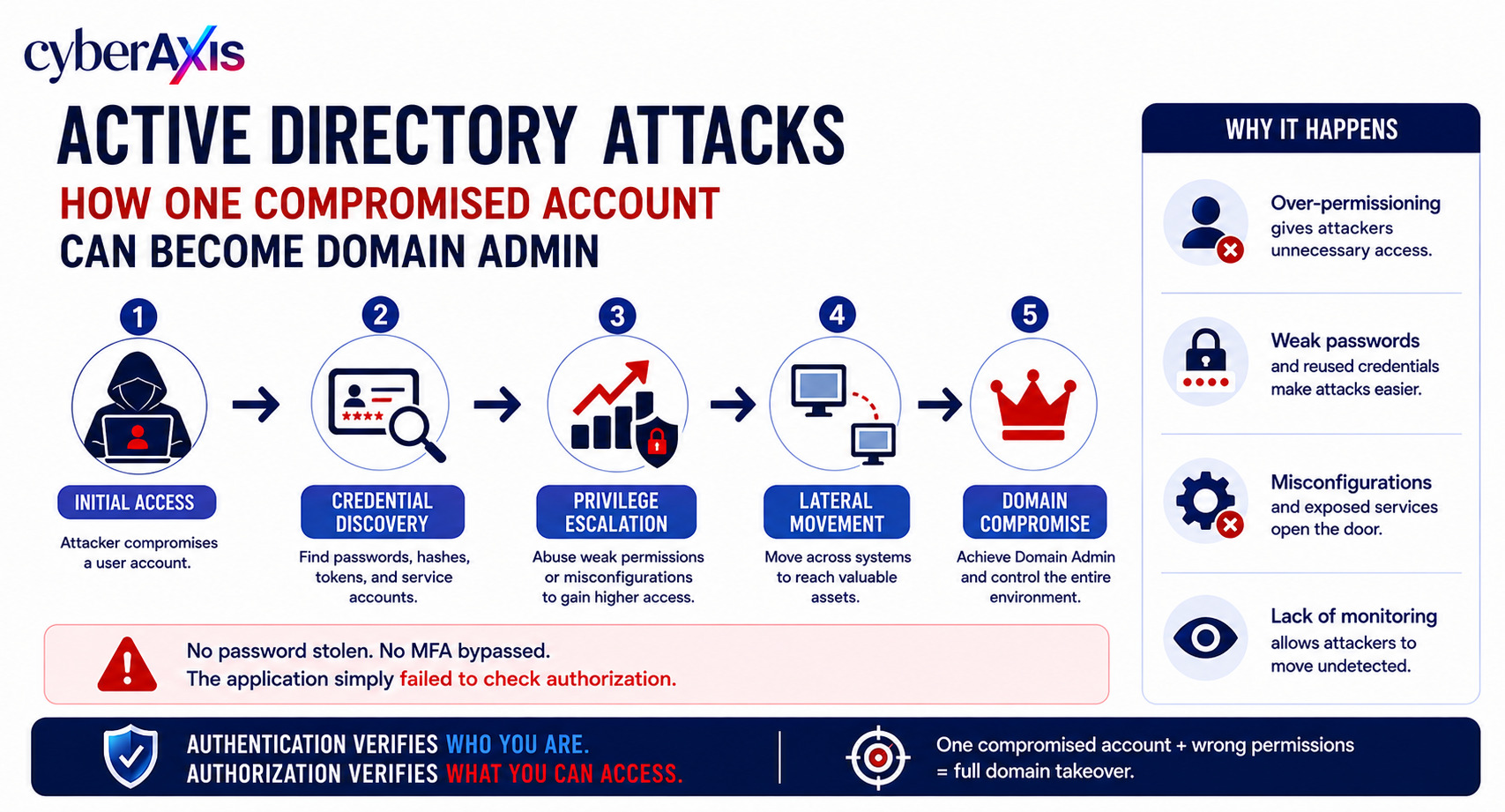
Imagine an attacker compromises a single employee account.
At first, the account has limited access.
It can log in to a few systems, access some shared folders, and use normal business applications.
So, how does that become a Domain Administrator account?
The attacker doesn't necessarily need to exploit a single critical vulnerability.
Instead, they may move through the environment by abusing credentials, excessive permissions, misconfigurations, weak service accounts, and trust relationships.
This is why Active Directory security is so important in enterprise environments.
What Is Active Directory?
Active Directory (AD) is Microsoft's directory and identity management service widely used in Windows enterprise environments.
It manages and controls resources such as:
Users
Computers
Servers
Groups
Policies
Applications
Authentication
Authorization
A typical environment may contain hundreds or thousands of accounts and systems.
The problem?
If an attacker compromises one account and discovers a path to higher privileges, that initial compromise can become a much larger breach.
How Does an Active Directory Attack Progress?
A typical attack path may look like:
Initial Access → Credential Discovery → Privilege Escalation → Lateral Movement → Domain Compromise
The attacker doesn't necessarily jump directly from a normal user to Domain Admin.
Instead, they gradually build access.
For example:
Compromised Employee Account
↓
Discover Accessible Systems
↓
Find Weak Credentials or Excessive Permissions
↓
Compromise a More Privileged Account
↓
Move to Critical Systems
↓
Gain Domain-Level Control
This process is often referred to as privilege escalation and lateral movement.
Common Active Directory Attack Techniques
1. Credential Theft
Attackers often target credentials because credentials provide legitimate access to systems.
Credentials may be exposed through:
Malware
Phishing
Password reuse
Insecure scripts
Misconfigured applications
Shared credentials
Credential dumping
Once attackers obtain additional credentials, they may attempt to move to systems with higher privileges.
2. Password Spraying
Instead of repeatedly attacking one account, attackers may try a small number of commonly used passwords against many accounts.
This can help attackers avoid account lockout thresholds that would be triggered by repeatedly attacking a single user.
Weak password policies and reused passwords increase the risk.
Defense: Use strong password policies, MFA, account monitoring, and detection for abnormal authentication patterns.
3. Kerberoasting
Active Directory environments often contain service accounts used by applications and services.
Some service accounts use passwords that may be vulnerable to offline password attacks if their authentication material is obtained.
An attacker who compromises a suitable low-privileged account may attempt to identify service accounts and target their credentials.
If a service account has excessive privileges, compromising it can provide a path toward higher-level access.
Defense: Use strong, managed service-account credentials, reduce unnecessary privileges, and monitor unusual service-account activity.
4. Pass-the-Hash
Windows environments can use credential material that allows authentication without requiring the user's plaintext password.
If an attacker obtains certain authentication material, they may attempt to reuse it to authenticate to other systems.
This can allow lateral movement without knowing the original password.
Defense: Use modern authentication protections, reduce administrative privileges, isolate privileged accounts, and monitor abnormal authentication activity.
5. Excessive Privileges
One of the biggest Active Directory risks isn't always a technical vulnerability.
It's over-permissioning.
Imagine a regular employee account that has unnecessary access to:
Server administration
Shared folders containing sensitive information
Application administrator groups
Service accounts
Other privileged resources
If that account is compromised, the attacker's path becomes much easier.
Defense: Follow the Principle of Least Privilege and regularly review group memberships and permissions.
6. Lateral Movement
Once attackers compromise one system, they rarely stop there.
They may search for:
Other user accounts
Administrators
File servers
Application servers
Domain controllers
Service accounts
Remote management systems
The attacker gradually moves from a less valuable system toward more valuable systems.
This is known as lateral movement.
7. Group Policy Abuse
Group Policy controls configuration and security settings across Windows environments.
If attackers gain excessive permissions over Group Policy, they may potentially influence many systems at once.
Because Group Policy can affect large numbers of machines, unauthorized changes can have significant consequences.
Defense: Restrict administrative access, monitor Group Policy changes, and regularly review privileged permissions.
Example 1 – How One Account Becomes Domain Admin
Imagine an attacker compromises an employee's Microsoft 365 and Windows credentials.
The employee is not an administrator.
At first, the attacker appears to have limited access.
They begin mapping the environment and discover that the compromised account can access an internal application server.
The server contains credentials associated with a service account.
That service account has more privileges than necessary.
The attacker compromises the service account and discovers that it has administrative access to several servers.
From there, the attacker identifies another privileged account and eventually reaches systems with domain-level privileges.
The attacker ultimately gains control over the Active Directory environment.
The initial compromise was only one ordinary employee account.
The real problem was the chain of weaknesses:
Compromised Account → Excessive Access → Weak Service Account → Privileged Credentials → Lateral Movement → Domain Compromise
Lesson: Domain compromise is often the result of multiple small security weaknesses combining into one attack path.
Why Domain Admin Access Is So Dangerous
The Domain Admins group has extremely powerful privileges within an Active Directory domain.
If an attacker gains effective domain-level administrative control, they may be able to:
Control domain-joined systems
Create or modify accounts
Change security policies
Access sensitive systems
Deploy malicious software
Disable security controls
Access confidential information
Establish persistence across the environment
At this point, the organization is facing a major security incident.
How to Protect Active Directory
Active Directory security requires multiple layers of protection.
1. Enforce Least Privilege
Users should receive only the permissions required for their job.
Regular employees should not have unnecessary administrative privileges.
2. Protect Privileged Accounts
Separate normal user accounts from administrative accounts.
Privileged accounts should have stronger authentication and stricter monitoring.
3. Enable MFA
Use MFA for important identity systems and privileged access wherever supported.
4. Use Strong Service Account Management
Avoid shared passwords and manually managed service-account credentials where possible.
Use managed service accounts and regularly review service-account permissions.
5. Segment Administrative Access
Administrative credentials should not be routinely used on ordinary employee workstations.
Separating privileged administration from everyday activity reduces credential exposure.
6. Monitor Authentication
Look for:
Unusual login locations
Abnormal login times
Repeated authentication failures
New administrative activity
Unexpected lateral movement
Privileged account usage
7. Monitor Domain Controllers
Domain Controllers are among the most critical systems in an Active Directory environment.
Organizations should closely monitor:
New user creation
Group membership changes
Privilege escalation
Policy changes
Authentication anomalies
Suspicious administrative activity
8. Regularly Review Permissions
An account that needed elevated access six months ago may not need it today.
Regular access reviews help remove unnecessary privileges.
How SOC Teams Detect Active Directory Attacks
A SOC can correlate identity, endpoint, and network telemetry to identify suspicious activity.
Useful indicators include:
Multiple failed logins followed by a successful login
One account authenticating to many systems
Unusual privileged-account usage
New members added to administrative groups
Unexpected account creation
Suspicious authentication patterns
Abnormal PowerShell or remote administration activity
Unusual access to Domain Controllers
Large numbers of authentication attempts across systems
A single event may look normal.
Several related events may reveal an attack path.
For example:
Compromised User → New Server Access → Service Account Activity → Privileged Group Change
That sequence should immediately attract attention.
What VAPT Teams Look For
During an authorized Active Directory security assessment, testers may evaluate:
Weak password policies
Excessive privileges
Dangerous group memberships
Service-account security
Legacy authentication
Trust relationships
Administrative exposure
Misconfigured Group Policy
Lateral movement opportunities
Attack paths toward privileged accounts
Tools such as BloodHound can help security teams visualize relationships and identify potential privilege-escalation paths within an authorized environment.
The goal is to identify dangerous attack paths before a real attacker discovers them.
Final Thoughts
Active Directory attacks rarely depend on one magical technique.
They often succeed because several small weaknesses connect together.
A compromised employee account.
An overprivileged service account.
Weak credential protection.
Poor segmentation.
Insufficient monitoring.
Together, these can create a path from:
One Employee Account → Domain Admin
That is why Active Directory security is not just about protecting passwords.
It is about controlling who can access what, from where, and with how much privilege.
Remember: Attackers don't always need to steal Domain Admin credentials directly. Sometimes they build a path to Domain Admin one weak permission at a time.

Comments 0
Email-verified comments are reviewed before they are published.