
QR Code Phishing Risk
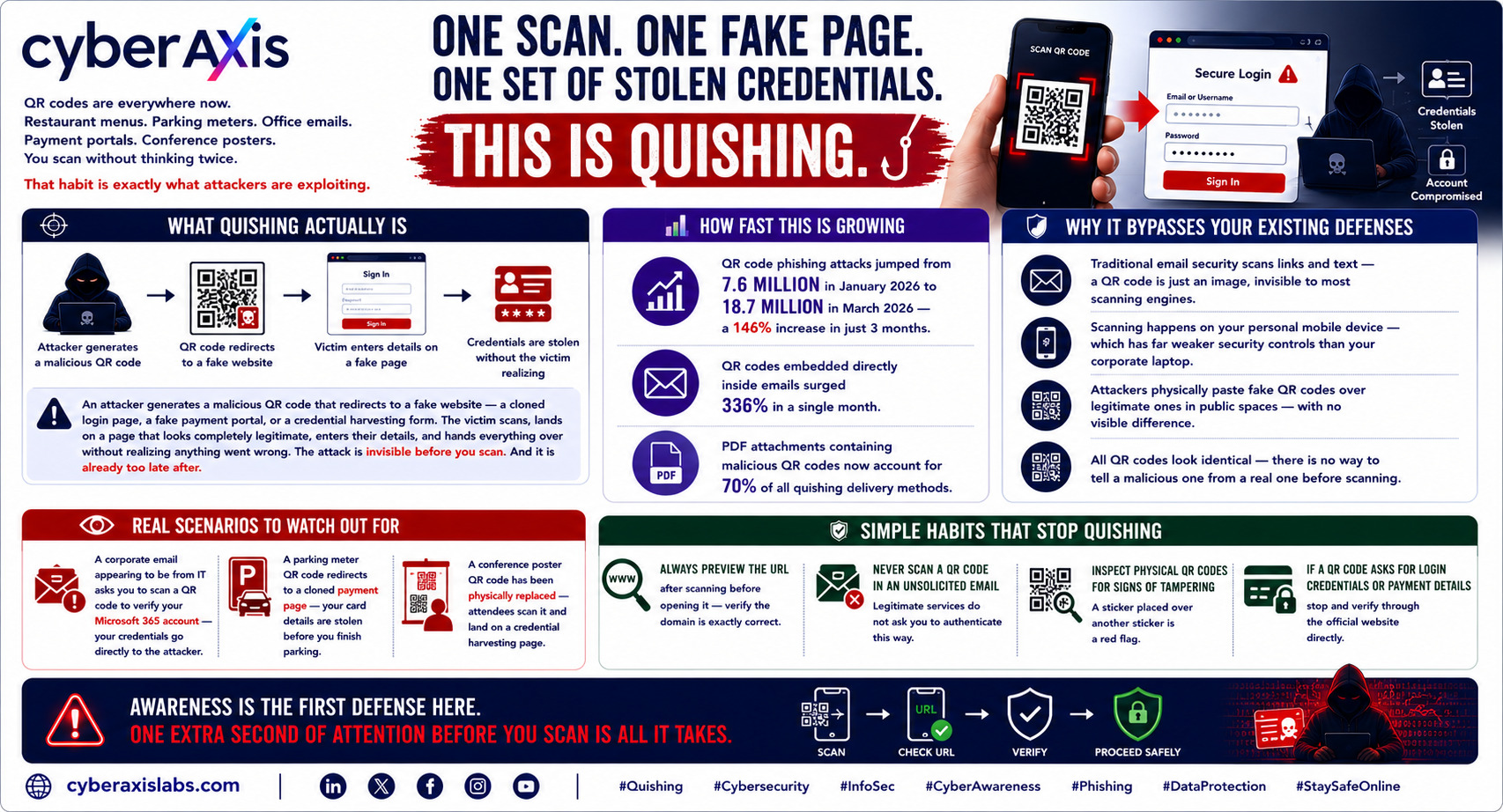
One Scan. One Fake Page. One Set of Stolen Credentials. This Is Quishing.
QR codes are everywhere now.
Restaurant menus. Parking meters. Office emails. Payment portals. Conference posters.
You scan without thinking twice.
That habit is exactly what attackers are exploiting.
Quishing — QR Code Phishing — is not a future threat. It is happening right now, at a scale most people haven't noticed yet.
What quishing actually is:
An attacker generates a malicious QR code that redirects to a fake website — a cloned login page, a fake payment portal, or a credential harvesting form. The victim scans, lands on a page that looks completely legitimate, enters their details, and hands everything over without realizing anything went wrong.
The attack is invisible before you scan. And it is already too late after.
How fast this is growing:
→ QR code phishing attacks jumped from 7.6 million in January 2026 to 18.7 million in March 2026 — a 146% increase in just 3 months
→ QR codes embedded directly inside emails surged 336% in a single month
→ PDF attachments containing malicious QR codes now account for 70% of all quishing delivery methods
Why it bypasses your existing defenses:
✦ Traditional email security scans links and text — a QR code is just an image, invisible to most scanning engines
✦ Scanning happens on your personal mobile device — which has far weaker security controls than your corporate laptop
✦ Attackers physically paste fake QR codes over legitimate ones in public spaces — with no visible difference
✦ All QR codes look identical — there is no way to tell a malicious one from a real one before scanning
Real scenarios to watch out for:
→ A corporate email appearing to be from IT asks you to scan a QR code to verify your Microsoft 365 account — your credentials go directly to the attacker
→ A parking meter QR code redirects to a cloned payment page — your card details are stolen before you finish parking
→ A conference poster QR code has been physically replaced — attendees scan it and land on a credential harvesting page
Simple habits that stop quishing:
→ Always preview the URL after scanning before opening it — verify the domain is exactly correct
→ Never scan a QR code in an unsolicited email — legitimate services do not ask you to authenticate this way
→ Inspect physical QR codes for signs of tampering — a sticker placed over another sticker is a red flag
→ If a QR code asks for login credentials or payment details — stop and verify through the official website directly
Awareness is the first defense here. One extra second of attention before you scan is all it takes.
cyberaxislabs.com
#CyberAxisLabs #Quishing #Phishing #Cybersecurity #InfoSec #EmailSecurity #MobileSecurity #CyberAwareness
We appreciate your feedback - share your comments at [email protected]
Comments 0
Email-verified comments are reviewed before they are published.