
Microsoft Defender XDR
Modern cyberattacks rarely stay in one place.
An attacker may start with a phishing email, compromise a user account, access a device, and then move toward sensitive data.
The problem is that each stage can generate alerts from different security tools.
This is where Microsoft Defender XDR becomes useful.
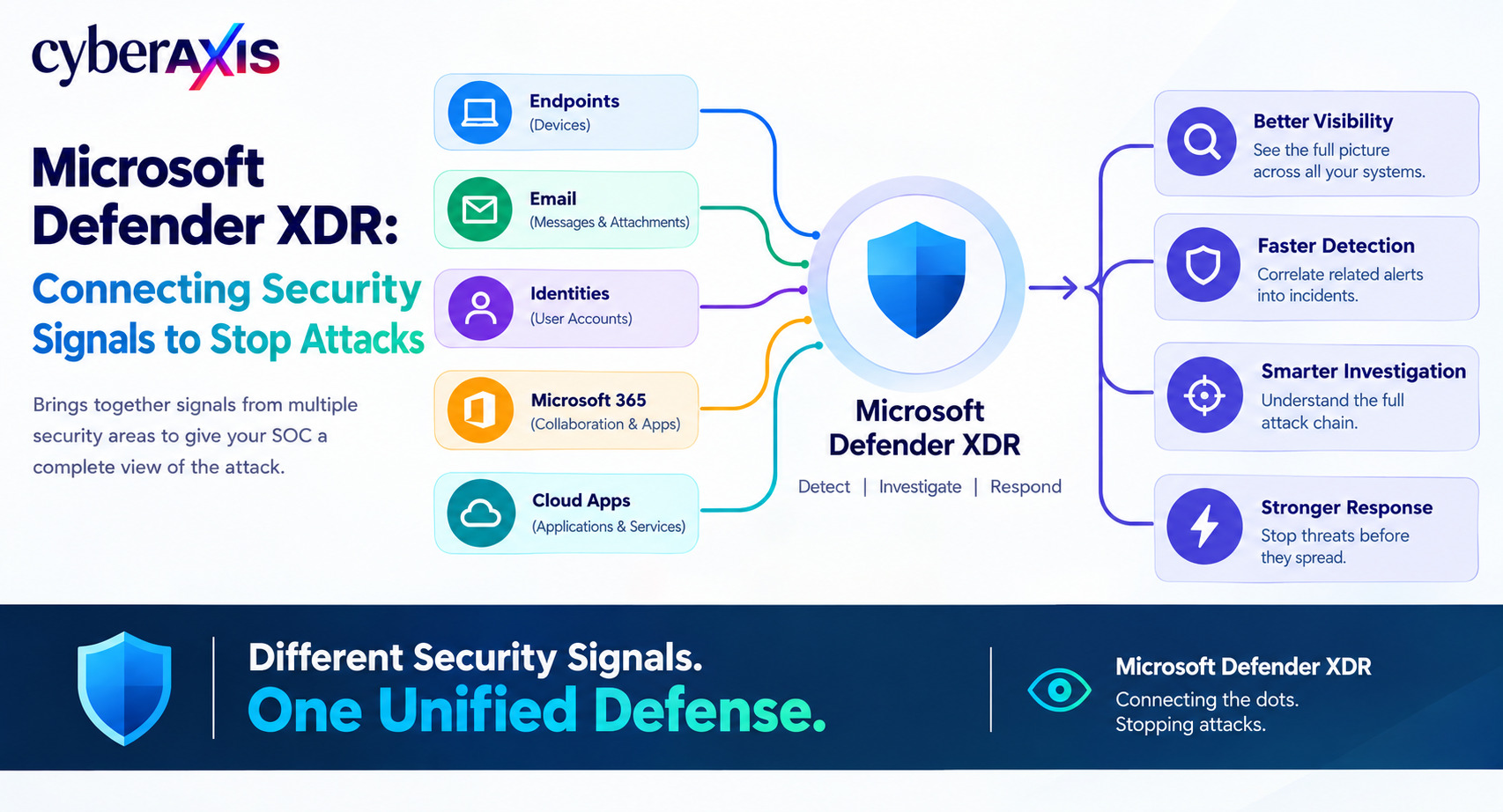
Microsoft Defender XDR is a unified security platform that brings together security signals from endpoints, identities, email, Microsoft 365, and cloud applications to help security teams detect, investigate, and respond to threats.
What Is Microsoft Defender XDR?
XDR stands for Extended Detection and Response.
Instead of protecting only one security area, XDR connects multiple areas together.
For example:
Endpoint Security → Devices
Email Security → Emails and Attachments
Identity Security → User Accounts
Cloud Security → Cloud Applications
Microsoft Defender XDR brings these signals together in the Microsoft Defender portal.
Its major security components include:
Microsoft Defender for Endpoint
Microsoft Defender for Office 365
Microsoft Defender for Identity
Microsoft Defender for Cloud Apps
The main idea is:
Different Security Signals → One Security View → Faster Investigation
Why Do Organizations Use Defender XDR?
The biggest benefit is visibility and correlation.
Imagine this sequence:
Phishing email
↓
User clicks malicious link
↓
Suspicious sign-in
↓
Unusual activity on the endpoint
↓
Suspicious PowerShell execution
Individually, these may look like separate alerts.
Together, they may represent one attack.
Defender XDR can correlate related alerts into an incident, helping analysts understand the bigger picture instead of investigating every alert separately.
Main Defender XDR Components
1. Microsoft Defender for Endpoint
Protects and monitors endpoint devices.
Analysts can investigate:
Processes
Files
Device activity
Suspicious behavior
Endpoint detections
This helps answer questions such as:
What process executed?
Which user was logged in?
What happened before the alert?
2. Microsoft Defender for Office 365
Protects email and Microsoft 365 collaboration resources.
Security teams can investigate:
Who received the malicious email?
Who clicked the link?
Was the same email sent to other employees?
This is especially useful for phishing and malicious attachment investigations.
3. Microsoft Defender for Identity
Focuses on identity-related threats.
It can help investigate:
Suspicious authentication
Credential abuse
Account compromise
Lateral movement
This is important because attackers often target user identities as a way into an organization.
4. Microsoft Defender for Cloud Apps
Provides visibility into cloud applications and helps organizations identify suspicious cloud activity and potential shadow IT.
Incident Correlation
One of the most useful concepts in Defender XDR is incident correlation.
For example:
10:00 — Suspicious email received
10:05 — User clicks malicious link
10:08 — Unusual sign-in detected
10:12 — PowerShell starts on the endpoint
10:15 — Endpoint connects to a suspicious destination
Instead of treating these as five unrelated alerts, Defender XDR can help security analysts investigate them as a connected incident.
This gives the SOC more context.
Advanced Hunting
Defender XDR also provides Advanced Hunting, which allows analysts to proactively search security data for suspicious activity.
Advanced Hunting uses Kusto Query Language (KQL).
A simple example:
DeviceProcessEvents
| where FileName =~ "powershell.exe"
| summarize Count=count() by DeviceName
An analyst could use searches like this to investigate PowerShell activity across devices.
The basic process is:
Collect Data → Query Data → Find Suspicious Activity → Investigate
This makes Advanced Hunting useful for threat hunting and detection development.
Realistic Example – Compromised Employee Account
Imagine an attacker steals an employee's credentials.
The attacker:
Logs into the account
↓
Accesses an unusual resource
↓
Creates a suspicious email rule
↓
Uses the employee's endpoint
↓
Executes a malicious process
With Defender XDR, the SOC can investigate identity, email, endpoint, and cloud activity together.
The analyst can ask:
How did the attack begin?
Which account was compromised?
Which device was affected?
What did the attacker do?
Did the attacker move further into the environment?
This is the key value of XDR: connecting the pieces of an attack.
Defender XDR in a SOC
A simplified SOC workflow is:
Security Signals
↓
Microsoft Defender XDR
↓
Incident
↓
Triage
↓
Investigation / Hunting
↓
Containment
↓
Remediation
A SOC analyst may use Defender XDR to investigate alerts, correlate events, hunt for related activity, and support response actions.
Defender XDR vs SIEM
XDR and SIEM are related, but they serve different purposes.
XDR focuses on security signals across multiple security domains and supports detection, investigation, and response.
SIEM focuses more broadly on collecting, storing, searching, and analyzing security data from many sources.
Microsoft Sentinel is Microsoft's SIEM platform and can work together with Defender XDR.
A common architecture is:
Defender XDR → Detection & Response
Microsoft Sentinel → Broader SIEM Operations
Why Should SOC Analysts Learn Defender XDR?
Learning Defender XDR helps SOC analysts develop skills in:
Endpoint Detection
Identity Investigation
Email Security
Threat Hunting
Incident Investigation
KQL
Security Response
The important skill is not just reading an alert.
It is understanding how different security events connect to tell the story of an attack.
Final Thoughts
Modern attacks can involve multiple security layers:
Email → Identity → Endpoint → Cloud → Data
Security teams therefore need visibility across those layers.
Microsoft Defender XDR helps bring those security signals together so analysts can correlate alerts, investigate incidents, hunt for threats, and support response.
A single alert tells you that something happened. Correlated security signals help you understand what actually happened.
Remember: Microsoft Defender XDR is about connecting security signals to give the SOC a clearer view of the complete attack.
Comments 0
Email-verified comments are reviewed before they are published.